
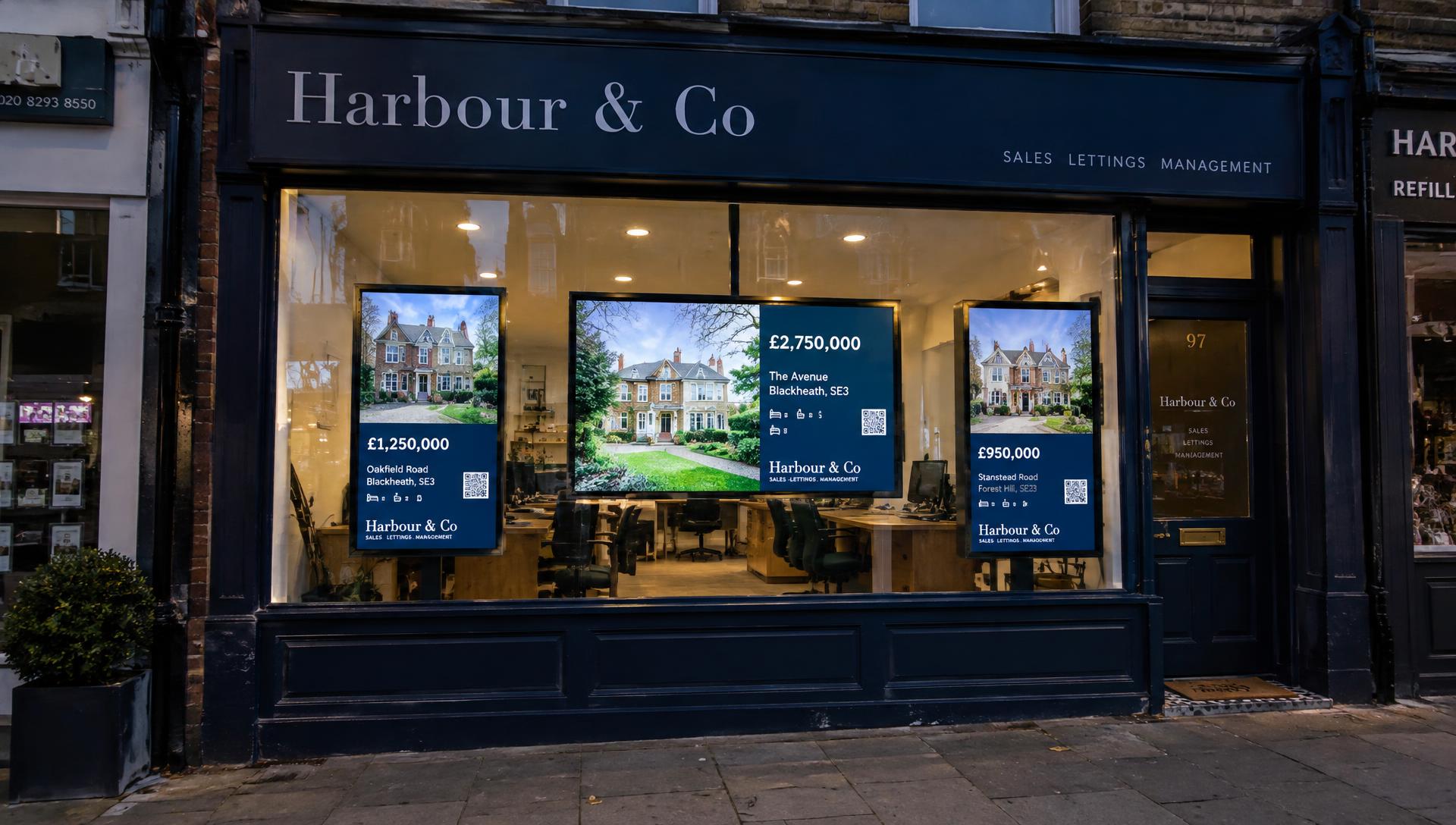
Why estate agency window displays still matter
Most buyers start their search online, yet the high-street window keeps working for you in ways a portal cannot. It is seen by people who live nearby, walk past every day and may be thinking about moving long before they register anywhere. It also tells potential sellers how active and well presented your agency is, often before they have ever spoken to you.
A well-kept window signals a busy, organised office. A faded card for a property that sold weeks ago signals the opposite. Whatever system you use, the window is part of your valuation pitch.
For prospective vendors in particular, a well-presented window that is kept up to date is a visible example of how you market property. It won't win instructions on its own, but it gives homeowners an early sense of the care and standards they can expect if they choose you.
Traditional printed property cards and cable systems
The classic setup is a printed card for each property, held in an acrylic pocket and suspended on steel cables or rods. It is simple, familiar and works without power.
- Strengths: low technical complexity, nothing to switch on, and passers-by can see several properties at the same time, comparing them at a glance.
- Limitations: each change means designing, printing and hanging a new card. Space is fixed, so the number of properties you can show is limited by the size of your window.
- Day to day: someone has to keep track of what has sold, reduced or come to market, and update the window to match.
LED illuminated window displays and light pockets
LED light pockets are backlit panels that sit behind a printed card or transparency, making it glow evenly. They are widely used because they keep cards readable after dark and make the window stand out on a winter evening.
The content is still printed, so updating works exactly as it does with standard cards. The difference is presentation and evening visibility, plus the need for power and cabling to each panel. We cover this in more depth in our guide to LED light pockets vs digital screens.
Digital property displays using screens or suitable TVs
A digital display replaces printed content with a screen that shows a rotating sequence of properties, brand messages and adverts. Screens can be mounted in landscape or portrait, and one screen can show far more properties over time than a single card pocket. The trade-off is that each property is on screen for a set time, whereas a row of printed cards lets passers-by see several properties simultaneously.
Updates happen in software rather than at the printer. With Vierra Screens, property information comes from your connected property software, so when a listing changes the display follows. Our guide to digital window displays for estate agents explains layouts, hardware and brightness in detail.
Comparing the different approaches
There is no single right answer. The table below summarises the practical differences. We have not included prices because equipment and installation costs vary widely by supplier, window size and specification.
| Printed cards and cables | LED light pockets | Digital screens | |
|---|---|---|---|
| Initial equipment | Pockets and cable or rod fittings | Illuminated panels, power supply and fittings | Screens, mounts and power; a software subscription |
| Ongoing costs | Printing and card stock | Printing, card stock and electricity | Software subscription and electricity |
| How content is updated | Print and hang a new card | Print and replace the card in the panel | Changes in software, often automatically from your listings |
| Properties shown | Several visible at once; one per pocket, limited by space | Several visible at once; one per panel, limited by space | A larger number over time, through automatic rotation |
| Visual flexibility | Fixed print design | Fixed print design, illuminated | Layouts, photos, video adverts and branding can change |
| Maintenance | Replacing worn cards and fittings | Panel, cable and power supply checks | Screen care, connectivity and occasional updates |
| Best suited to | Low-traffic or shaded windows, small stock | Offices wanting strong evening visibility | Offices with changing stock or a desire to show more |
How Vierra Screens helps agents manage digital displays
Vierra Screens is software that turns compatible Smart TVs and suitable commercial displays into automatic property windows.
- Listings from your property software: properties are imported from your connected system, so you don't maintain the same stock twice.
- No playlist to build: Vierra works out the rotation for you.
- Enhanced properties: give selected properties more prominent layouts for a period you choose.
- Your own campaigns: add finished image or short-video adverts and choose how often they appear.
- Scan to enquire: property QR codes open a branded mobile page where passers-by can save, share or enquire.
See the full feature list on the Vierra Screens homepage.
What to consider before choosing a display system
Your window and its light
A shaded window and a south-facing window behave very differently. Strong sunlight can wash out ordinary TVs, so check brightness requirements before buying screens.
Whether a screen is suitable
If you choose screens, suitability depends on more than size. Check screen brightness and exposure to sunlight, operating-system and Vierra Screens compatibility, the manufacturer's supported operating hours, and the mounting position, ventilation and installation conditions. Vierra Screens does not work with every Smart TV or commercial screen, so confirm compatibility before buying.
How often your stock changes
If listings change several times a week, the time spent reprinting cards adds up. Software-driven displays reduce that work.
Who will look after it
Think about who updates the window today and how much of their time it takes. The best system is the one that stays accurate without relying on someone remembering.
Power, mounting and security
Illuminated panels and screens both need power. Screens also need secure mounting and an internet connection.